ApplicationsTarifsAssistanceBlog

Testeur de fuite WebRTC

Un test de fuite WebRTC permet de vérifier que votre navigateur ne transmet pas votre adresse IP aux sites Web que vous visitez

Chargement…

Protect your online activity

ClearVPN veille à ce que toutes vos requêtes WebRTC soient acheminées de façon sécurisée via un tunnel chiffré pour bloquer les fuites éventuelles. Puisque nous ne conservons aucun historique, votre confidentialité reste protégée.

WebRTC, qu'est-ce que c'est ?

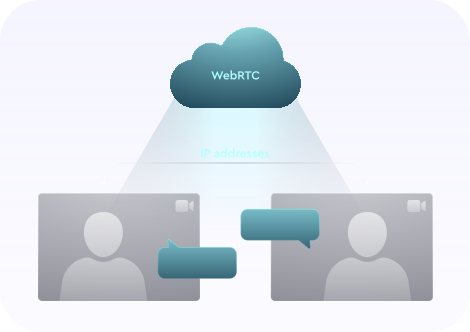
Web Real-Time Communication (WebRTC) is a collection of standardized technologies that allows web browsers to communicate with each other directly without the need for an intermediate server. Benefits of WebRTC include: faster speeds and less lag for web apps like video chat, file transfer, and live streaming.

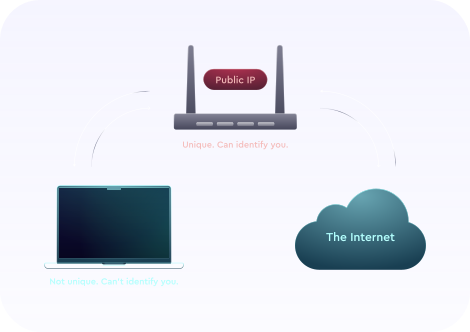
Any two devices talking to each other directly via WebRTC, however, need to know each other's real IP addresses. In theory this could allow a third-party website to exploit the WebRTC in your browser to detect your real IP address and use it to identify you. This is what we call a WebRTC leak.

Any leak of your public IP address is a threat to your privacy, but WebRTC leaks are lesser-known and easily overlooked, and not all VPN providers protect you from them!

Quelles sont les conséquences d'une fuite WebRTC ?

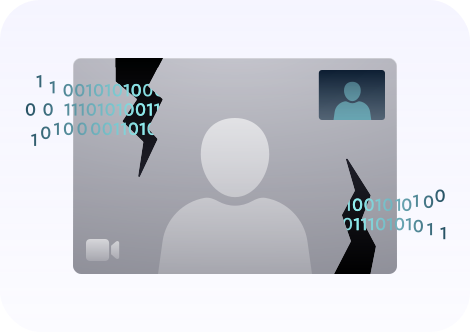
This is the visibility of an IP address, which can pose a big security risk for an end-user. WebRTC leaks take place when you're trying to establish video or audio communication with another person via a browser that uses WebRTC technology. A browser then reveals your IP address — that's why it's called a leak.

As long as WebRTC is turned on in your browser and you're on a website that uses it, your real IP address will be visible, and, therefore, it will be leaking. The only way to avoid a WebRTC leak is to turn it off in your browser (more on how to do this later).

5 étapes pour confirmer une fuite WebRTC (en activant et désactivant un VPN)

If you're not using a VPN you will undoubtedly be exposing some private information to third parties. If you are using a VPN and the leak tool indicates there may be a leak, then you can perform the following leak test to be sure:

  1. Disconnect from the VPN and open this page in a new tab or window.
  2. Make a note of any public IP addresses you see.
  3. Close the page.
  4. Connect to the VPN and reopen this page.
  5. If you still see any of the public IP addresses from Step 2, then you have a privacy leak.

Quels sont les navigateurs les plus vulnérables ?

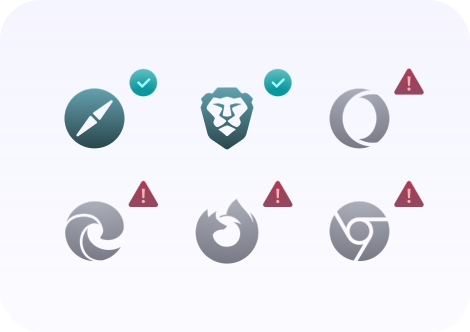
As of this writing, users of Firefox, Chrome, Opera, and Microsoft Edge are most vulnerable to WebRTC leaks because these browsers have WebRTC enabled by default.

Note that you may be safe from WebRTC leaks in one browser and not in another. If you regularly use multiple browsers, then you should consider using the ClearVPN WebRTC Leak Tester on each of them.

Comment se protéger contre les fuites WebRTC ?

Vous pouvez désactiver certaines fonctionnalités WebRTC dans les paramètres de votre navigateur. Dans les sections suivantes, nous expliquons la marche à suivre dans Google Chrome, Safari, Firefox, Opera et Microsoft Edge

It’s best to use an extension to disable WebRTC on Chrome because doing it manually can cause damage to the functionality of your browser. Here are a couple of extensions you could use:

  • WebRTC Network Limiter is an official Google extension that tinkers with WebRTC settings to stop any IP leaks without completely blocking it;
  • uBlock Origin isn’t dedicated to WebRTC alone, but it has a feature to disable it on your browser.

There’s no need to disable WebRTC in Safari. Safari’s permissions model is stricter than those of most browsers. By default, no IP addresses are made available to websites except the one you use to access the site. Therefore you shouldn’t need to take any additional action to prevent WebRTC leaks in Safari. Note, however, that if you grant any particular site permission to use audio or video capture, you might expose your IPs.

  1. Type about:config into the address bar.
  2. Click the "I accept the risk!" button that appears.
  3. Type media.peerconnection.enabled in the search bar.
  4. Double-click to change the Value to "false"

This should work on both mobile and desktop versions of Firefox.

  1. Open Settings in Opera. To do this:
    1. On Windows or Linux, click the Opera logo at the top-left corner of the browser window;
    2. On Mac, click Opera in the toolbar and locate settings under Preferences.
  2. Expand the Advanced section on the left-hand side and click Privacy & security.
  3. Scroll down to WebRTC and select the Disable non-proxied UDP radio button.
  4. Close the tab and the settings should automatically save.

Unfortunately, there’s currently no way to completely disable WebRTC in Microsoft Edge. However, you can set your browser to hide your local IP address if you:

  1. Type about:flags into the address bar.
  2. Check the option marked Hide my local IP address over WebRTC connections.

Comment les ingénieurs de ClearVPN spécialistes de la détection des fuites assurent votre protection

ClearVPN vous protège contre un large éventail de fuites WebRTC sur différents navigateurs et différentes plateformes. Puisque WebRTC est une technologie relativement récente, il est important de tester en continu différents scénarios de fuites de WebRTC couvrant plusieurs plateformes et navigateurs. ClearVPN fait partie des références dans ce domaine, grâce à une équipe d'ingénieurs dédiés qui analysent en permanence les nouveaux vecteurs de fuite et développent rapidement les correctifs nécessaires.

Get ClearVPN
Notarized by Apple